
Note: This entire experiment runs on CPU only — no GPU required. If you have a modest machine and want to experiment with large language models without cloud costs or privacy concerns, this guide is for you.
Introduction
Running large language models (LLMs) locally has become increasingly accessible thanks to efficient inference engines and quantization techniques. While cloud-based APIs like OpenAI or Anthropic are convenient, there are compelling reasons to run models on your own hardware:
- Privacy: your prompts and data never leave your machine.
- Cost: no per-token billing after the initial setup.
- Offline use: no internet dependency once the model is downloaded.
- Control: full control over model parameters, context size, and prompt formatting.
This post documents my personal experiment running Mistral 7B Instruct v0.3, in its quantized GGUF form Q6_K, using Llama.cpp as the inference engine, entirely on CPU. I’ll walk through every step: setting up the environment, downloading the model, running inference, and sharing honest observations about performance and quality.
Setup & Requirements
Before diving in, here is the hardware and software environment used for this experiment:
| Component | Details |
|---|---|
| CPU | AMD Ryzen 7 / Intel Core i7 (any modern multi-core) |
| RAM | 16 GB minimum (Q6_K ~6.5 GB loaded) |
| Storage | ~5 GB free for the model file |
| OS | Linux (Ubuntu 22.04) |
| Python | 3.10+ |
| Build tools | cmake, make, gcc / clang |
The experiment was conducted entirely on CPU. Performance will vary depending on the number of cores and clock speed, but even a mid-range laptop can produce coherent responses — just at a slower tokens-per-second rate than a GPU setup.
Install the required build tools if not already present:
sudo apt update
sudo apt install -y build-essential cmake git python3-pip
What is Llama.cpp?
Llama.cpp is an open-source C/C++ inference engine created by Georgi Gerganov. It was originally built to run Meta’s LLaMA models on consumer hardware, and has since grown into a universal LLM runtime supporting dozens of model architectures
Llama.cpp is the go-to choice for CPU-based LLM inference. It requires no GPU, being heavily optimized for CPU execution through AVX2 and AVX-512 intrinsics, which allow it to extract maximum performance from consumer hardware. The use of GGUF quantized models dramatically reduces memory requirements, making it accessible even on machines with limited RAM. Beyond raw performance, Llama.cpp offers excellent cross-platform support, running seamlessly on Linux, macOS, and Windows. The project maintains active development, with new model architectures and quantization formats gaining support rapidly. Perhaps most importantly, it provides a flexible interface, as users can interact via the command line, deploy a server mode with an OpenAI-compatible REST API, or integrate it into Python applications using the llama-cpp-python bindings.
The native format Llama.cpp uses is GGUF (GPT-Generated Unified Format), which bundles weights, tokenizer, and metadata into a single portable file.
What is Mistral 7B and Why Quantize It?
Mistral 7B is a 7-billion-parameter language model released by Mistral AI. Despite its relatively modest parameter count compared to models like LLaMA 70B or GPT-4, it is remarkably capable at instruction-following, coding assistance, and summarisation tasks. The Instruct v0.3 variant is the latest refinement of the instruct series, fine-tuned for instruction-following using a chat-style prompt format and updated tokenizer support.
Why quantize?
A full-precision (FP16) Mistral 7B model requires roughly 14 GB of RAM, which is impractical for most consumer machines, especially on CPU. Quantization reduces the bit-width used to represent each weight:
| Quantization | File size | RAM usage | Quality loss |
|---|---|---|---|
| FP16 | ~14 GB | ~14 GB | None (reference) |
| Q8_0 | ~7.7 GB | ~8 GB | Minimal |
| Q6_K | ~5.9 GB | ~6.5 GB | Very low (near-lossless) |
| Q4_K_M | ~4.4 GB | ~5 GB | Low |
| Q2_K | ~2.9 GB | ~3.5 GB | Noticeable |
Q6_K uses 6-bit weights with the K-quant scheme, sitting just below Q8_0 in precision while remaining significantly smaller than FP16. It is the best choice when RAM allows it and quality is a priority, which is exactly the case in this experiment on a 16 GB machine.
Installing Llama.cpp (CPU build with CMake)
Clone the repository and build using CMake following Llama.cpp Instructions. The flags below target a pure CPU build — no CUDA, no Metal, no OpenCL.
# Clone the repository
git clone https://github.com/ggml-org/llama.cpp
cd llama.cpp

# Create and enter the build directory
cmake -B build
cmake --build build --config Release -j 8
After compilation, the main binary will be located at build/bin/llama-cli (older builds may produce ./main directly in the root). You can verify the build succeeded with:
./build/bin/llama-cli --version
CPU note: The build automatically detects and enables AVX, AVX2, and AVX-512 instruction sets when available. These SIMD extensions significantly improve token generation speed on modern CPUs without any GPU involvement.
Downloading the Quantized Model via Hugging Face
What is Hugging Face?
Hugging Face is the de-facto hub for open-source machine learning models, datasets, and tooling. It hosts hundreds of thousands of model repositories — including quantized GGUF variants maintained by the community. Think of it as GitHub, but specifically designed for AI assets.
Why use huggingface-cli?
The huggingface-cli is the official command-line interface for the Hugging Face Hub. Compared to a plain wget or browser download, it offers:
- Resumable downloads: interrupted transfers continue from where they stopped.
- Integrity verification: checksums are validated automatically.
- Authentication support: required for gated or private models.
- Selective file download: download only specific files from a multi-file repository (essential for GGUF repos, which often contain multiple quantization variants).
Installation
pip install huggingface_hub
Download the Q6_K GGUF model
The quantized models are hosted by TheBloke, a prolific community contributor who provides GGUF conversions for virtually every popular open-source model.
huggingface-cli download TheBloke/Mistral-7B-Instruct-v0.3-GGUF \
    mistral-7b-instruct-v0.3.Q6_K.gguf \
    --local-dir "/<...>/genAI_models" \
    --local-dir-use-symlinks False
Breaking down the command:
| Argument | Purpose |
|---|---|
TheBloke/Mistral-7B-Instruct-v0.3-GGUF |
Repository ID on Hugging Face |
mistral-7b-instruct-v0.3.Q6_K.gguf |
Specific file to download (Q6_K variant) |
--local-dir |
Target directory for the file (external drive in this case) |
--local-dir-use-symlinks False |
Write the actual file, not a symlink to the HF cache |
Using
--local-dir-use-symlinks Falseis especially important when saving to an external drive or any location outside your home directory, as it ensures the full file is written directly to the target path.
Once complete, verify the download:
ls -lh "/<...>/genAI_models/mistral-7b-instruct-v0.3.Q6_K.gguf"
# Expected: ~5.9 GB
Tip : if
huggingface-cliis not found: In practice I ran into issues where thehuggingface-clientry point was missing even withhuggingface_hubinstalled in a virtual environment. In that case, use the Python API directly, it is equivalent and always works as long as the package itself is importable:python -c " from huggingface_hub import hf_hub_download hf_hub_download( repo_id='bartowski/Mistral-7B-Instruct-v0.3-GGUF', filename='Mistral-7B-Instruct-v0.3-Q6_K.gguf', local_dir='/<...>/genAI_models' ) "Note that in
huggingface_hubv1.6.0+ thelocal_dir_use_symlinksargument is deprecated and can be omitted — symlinks are no longer used by default. Also note thatbartowskiis the correct community GGUF publisher for Mistral v0.3, as TheBloke has not published a v0.3 conversion.
Running the Model
With the model downloaded and Llama.cpp built, we can run our first inference. From inside the llama.cpp directory:
./build/bin/llama-cli \
    -m "/<...>/genAI_models/mistral-7b-instruct-v0.3.Q6_K.gguf" \
    -n 256 \
    -c 4096 \
    --temp 0.7 \
    --repeat-penalty 1.1 \
    -p "[INST] Explain what a neural network is in simple terms. [/INST]"
Key parameters explained:
| Flag | Description |
|---|---|
-m |
Path to the GGUF model file |
-n 256 |
Maximum number of tokens to generate |
-c 4096 |
Context window size (how much text the model “sees”) |
--temp 0.7 |
Temperature: controls randomness (0 = deterministic, 1 = creative) |
--repeat-penalty 1.1 |
Penalises repetitive outputs |
-p |
The prompt string |
Mistral Instruct format: Mistral Instruct models expect prompts wrapped in
[INST]and[/INST]tags. Omitting these tags will still produce output, but adherence to instructions degrades noticeably.
For interactive multi-turn conversation, use the -i flag with --interactive-first:
./build/bin/llama-cli \
    -m "/<...>/genAI_models/mistral-7b-instruct-v0.3.Q6_K.gguf" \
    -c 4096 \
    --temp 0.7 \
    -i --interactive-first \
    --in-prefix "[INST] " \
    --in-suffix " [/INST]"
Example Output
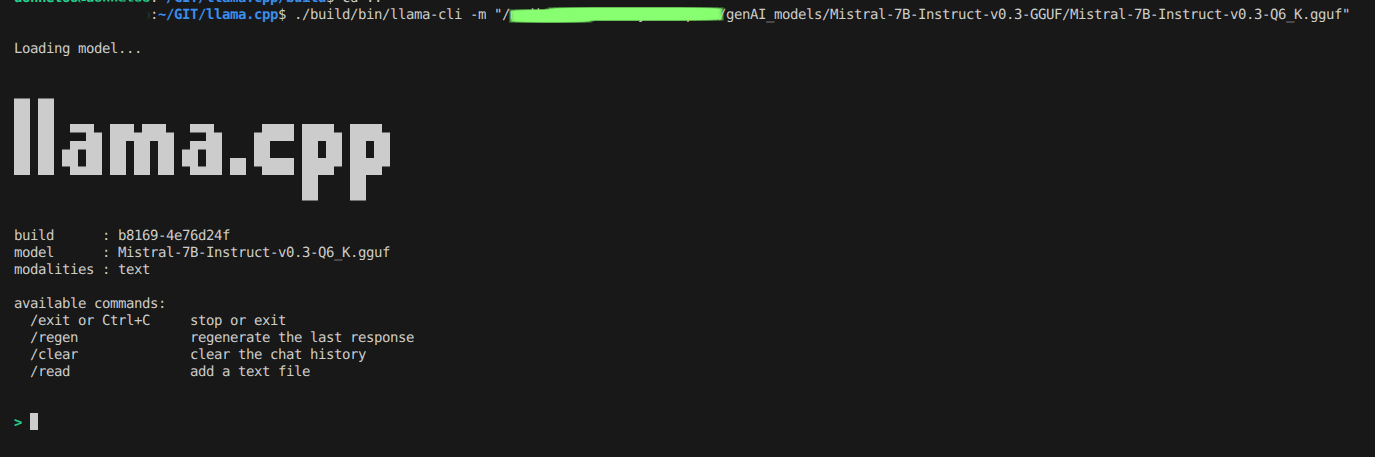
Here’s a screenshot of Llama.cpp running inference on Mistral 7B:
Running Llama.cpp as a Local Server
The command-line interface is useful for one-off prompts, while llama-server keeps the model loaded and makes it available through a local web interface and an OpenAI-compatible HTTP API. This lets other local applications send prompts to the model without loading it again for every request.
From the directory containing the llama-server executable, start the server with:
./llama-server \
    -m "/<...>/genAI_models/Mistral-7B-Instruct-v0.3-GGUF/Mistral-7B-Instruct-v0.3-Q6_K.gguf" \
    --host 127.0.0.1 \
    --port 8080 \
    -c 8192
If you built Llama.cpp with CMake as above, the executable is typically at build/bin/llama-server, so you can either run it from that directory or use its path from the repository root:
./build/bin/llama-server \
    -m "/<...>/genAI_models/Mistral-7B-Instruct-v0.3-GGUF/Mistral-7B-Instruct-v0.3-Q6_K.gguf" \
    --host 127.0.0.1 \
    --port 8080 \
    -c 8192
The server loads the model at startup and prints its listening address when it is ready. Keep that terminal open while using the service. On the same computer, open http://127.0.0.1:8080 in a browser to use the web interface. The 127.0.0.1 host binding makes the service accessible only from your own machine; it does not expose the model to other devices on your network.
Applications can also send requests to the OpenAI-compatible chat completions endpoint. For example:
curl http://127.0.0.1:8080/v1/chat/completions \
    -H "Content-Type: application/json" \
    -d '{
        "messages": [
            {"role": "user", "content": "Explain what a neural network is in simple terms."}
        ],
        "temperature": 0.7,
        "max_tokens": 256
    }'
Here --port 8080 selects the local port and -c 8192 sets the context window. To stop the service, return to its terminal and press Ctrl+C.
Experiment: What I Tested
Once everything was running, I wanted to put the model through its paces across a few different types of tasks, not a rigorous benchmark though, but a practical feel for what it could actually do on a CPU with no GPU assistance.
I started with straightforward conceptual questions, the kind you might ask when learning a subject: things like asking the model to explain what quantization means in the context of neural networks, or to walk through the difference between supervised and unsupervised learning. These gave me a quick baseline for how articulate and accurate the responses were before moving on to anything more demanding.
From there I shifted to coding tasks, which is where I personally care most about the output quality. I kept the prompts relevant to quantitative finance, for instance asking for a Python function to compute a simple moving average from a price series, or for an example of resampling OHLCV data to weekly frequency using pandas. These are simple but representative of the kind of day-to-day scripting a quant developer actually does. Stepping back and looking at the results through a quant researcher’s lens, what struck me most was not the raw speed, which is admittedly modest on CPU, but the model’s ability to reason coherently about financial concepts without any fine-tuning or domain-specific prompting. A local model like this could realistically serve as a private research assistant: drafting the boilerplate of a strategy description, explaining statistical concepts to non-technical stakeholders, or rapidly prototyping the skeleton of an analysis script before the researcher fills in the domain-specific logic. That alone makes the CPU performance trade-off worthwhile for a significant class of research workflows.
Finally I tested summarisation: I fed the model a short paragraph of financial text and asked it to distil the key points into three concise bullet points. This is a task where instruction-following matters as much as language quality, so it was a good stress-test for the [INST] prompt format.
All prompts were run at a temperature of 0.7 with a 256-token output ceiling. To get the most out of the available hardware, I passed -t $(nproc) to saturate all CPU threads during inference.
Conclusions
Running Mistral 7B Instruct v0.3 locally on CPU via Llama.cpp is entirely feasible with reasonable useful outputs. The Q6_K quantization delivers near-lossless quality at a manageable file size (~5.9 GB), making it an excellent choice when you have 16 GB of RAM and want output as close to the full-precision model as possible.
What stands out most is that no GPU is required to experiment meaningfully with 7B-parameter models. The combination of Llama.cpp and GGUF has matured into a reliable, well-tested stack for local inference. The main trade-off you’ll encounter is speed: expect 4–8 tokens per second on CPU, which is acceptable for experimentation and research but falls short of production throughput. For a developer or researcher iterating on ideas, however, that latency is often negligible compared to the privacy and cost benefits.
Looking ahead, I’m planning to explore the full quality and speed curve by testing other quantization levels like Q4_K_M and Q8_0 against the Q6_K baseline for quant tasks. I’m also curious about running Llama.cpp in HTTP server mode to expose an OpenAI-compatible local API endpoint, which would make integration into existing workflows seamless. Finally, a side-by-side comparison of Mistral 7B against other similarly-sized models (LLaMA 3 8B, Gemma 2 9B), under identical CPU conditions would help clarify which models offer the best bang for buck in the local inference space.
If you have a spare afternoon and a reasonably modern laptop, I encourage giving this a try. The barrier to entry for local LLM experimentation has never been lower.